Hostify Server Hosting Dashboard: A Modern Admin Interface
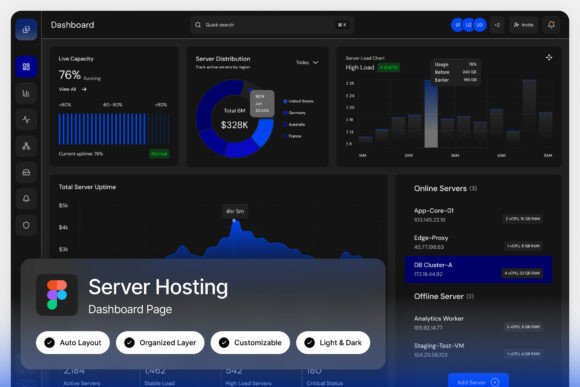
First impressions are everything, especially in the competitive world of web hosting and cloud services. The Hostify Server Hosting Dashboard landing page template is designed to make that first impression count, offering a clean and modern interface for cloud hosting providers, VPS management systems, and server monitoring platforms. It’s more than just a layout; it’s a professional tool that communicates reliability and technical sophistication from the moment a client logs in.
This template is built for technology-focused businesses that need their admin interfaces to feel as powerful and streamlined as the services they provide. The design prioritizes clarity and ease of use, ensuring that complex data and server metrics are presented in an intuitive, visually appealing way. For designers and developers building client portals or internal tools, this asset provides a polished foundation that saves significant development time while elevating the final product's quality.
Designed for Professional Tech and Hosting Platforms
The core value of the Hostify Server Hosting Dashboard lies in its thoughtful layout and modern typography. It solves a common design challenge: presenting dense technical information without overwhelming the user. The pixel-perfect layout ensures every element aligns perfectly, creating a seamless visual experience. With fully customizable layers and a well-organized file structure, adapting the design to match a specific brand identity is straightforward, even for those with moderate Figma experience.
Consider the practical applications for this design asset. It’s ideal for:
- Launching a new web hosting business with a client-facing dashboard that looks established and trustworthy.
- Redesigning an existing VPS management system to improve user experience and modernize the brand's appearance.
- Creating a professional demo or prototype for a server monitoring platform to attract investors or early adopters.
- Building internal admin tools for a tech company that require a clean, efficient, and branded interface.
The inclusion of both light and dark mode interfaces is a significant advantage. This allows the final product to cater to user preferences and different usage environments, enhancing accessibility and comfort. It demonstrates a user-centric design philosophy that clients and end-users will appreciate.
Tips for Implementing the Dashboard Design
When integrating a template like this, the goal is to make it your own. Start by reviewing the organized, named layers in the Figma file. This will help you quickly locate elements for customization. Swap out the placeholder content with your actual service names, metrics, and branding elements. Test the font pairings included with the template; the free Google Fonts are chosen for their readability and modern aesthetic, but you can explore alternatives that better match your brand's voice.
Pay close attention to the typography hierarchy. A strong typographic scale is crucial in dashboard design to guide the user's eye to the most important information, whether it's a server status alert or a key performance metric. The clean sans-serif fonts used here provide excellent legibility on screen, which is essential for data-heavy interfaces. Ensure your color choices for text and backgrounds maintain high contrast for accessibility.
Finally, remember that a great design asset like the Hostify Server Hosting Dashboard is a starting point. Its true power is unlocked through thoughtful customization that aligns with your specific user flows and business goals. The result is a more polished, professional, and trustworthy digital product that strengthens your brand identity and enhances user confidence.